
Create and edit a catalogue entry
If you have data stored in another system, but still wish to allow it to be featured on Koordinates.com, you can add a catalogue entry.
A catalogue entry is simply a list of basic information about your data, including an optional URL to its location in an external system.
-
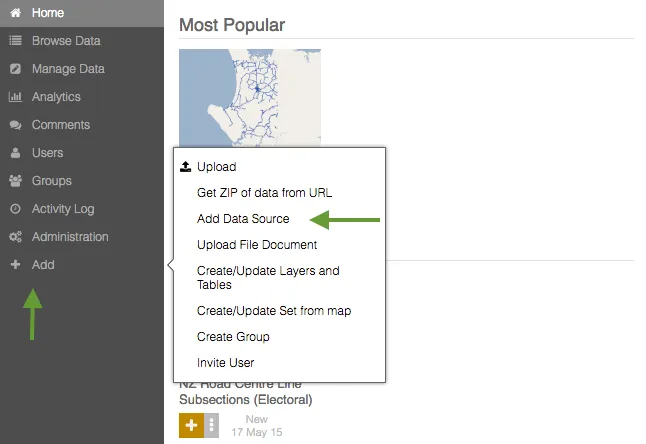
Select Add Data Source
You can create a catalogue entry by clicking Add on the main menu on the left of your screen, and then clicking Add Data Source.
-
Add information about your catalogue entry
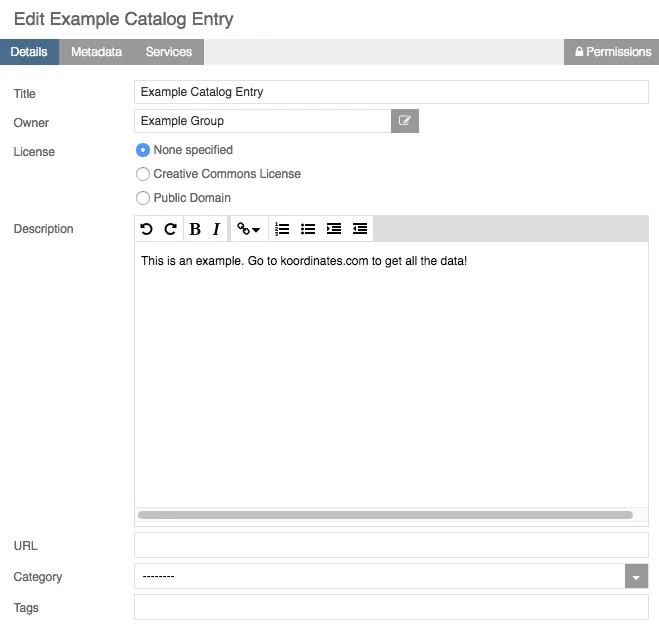
After you click Add Data Source, you will see a pop-up screen with a range of fields. Populate these fields with information about your data source, including:
Name: The title of your catalogue entry.
Owner: The group which takes responsibility for the dataset on your Koordinates site.
License: The license under which the entry is made available, if any.
Description: A short description of the dentry, to help users understand the data.
URL: A URL to access the data.
Category: Choose from existing categories on the site.
Tags: Add tags to make your entry easier to find.
-
Create your catalogue entry
Click Create to save the new entry. Note that your new entry will include a link to the resource if a URL is supplied.
-
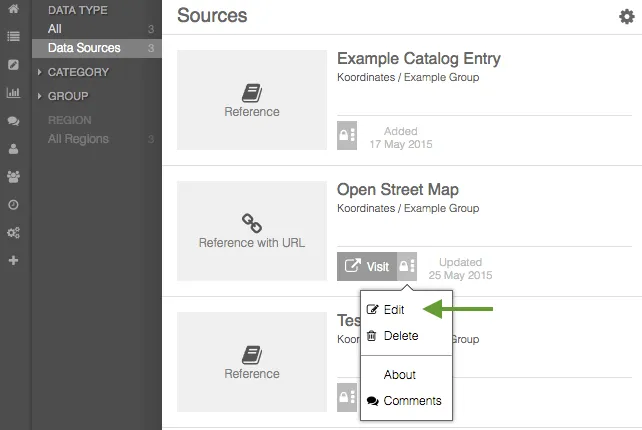
Select Edit for your catalogue entry
Locate the existing catalogue entry you wish to edit and click on the settings tab - that’s the small grey stripe
Select Edit from the menu.
-
Edit catalogue entry details
After selecting Edit, a pop-up window will enable you to edit the details of your chosen catalogue entry. These will be the same as are listed in 2., above.
-
Add metadata
Select the Metadata tab to add metadata on your catalogue entry.
-
Add to catalogue service
Select Services to add your catalogue entry to an existing catalogue service.
-
Edit permissions
Select Permissions in the top right to edit the permissions on your catalogue entry. To learn more about permissions on Koordinates site, read our guide.\