
API key scopes
An API key carries a set of scopes. Each scope lets the key use one area of the Koordinates APIs and web services, such as querying layer data, reading the catalog or creating exports. A request that needs a scope the key doesn’t have is usually refused.
Scopes limit what a key can do. They never widen it: a key can’t do more than the user account that created it, and it still follows dataset and service permissions and group membership. For example, a key with layers:write can only change layers that the account can already edit.
To create a key and choose its scopes, see Set scopes for an API token.
Choose the least access you need
Section titled “Choose the least access you need”Give each key only the scopes its application needs, and use a separate key for each application. If a key is exposed, the damage is limited to what its scopes allow, and you can delete that one key without breaking anything else.
- Prefer
readscopes. Add awritescope only when the application has to create, change or delete things. - Keys used by web services are often placed in URLs, for example
/services;key=YOUR_API_KEY/. URLs end up in browser history, server logs and shared screenshots. Make a key that is used this way a read-only key with only the data service scopes it needs (query,tiles,wxs:wfsorwxs:esri), and never give it awritescope. - Where your client can set a header, send the key as
Authorization: key YOUR_API_KEYrather than in the URL. The Query API, WMTS, the XYZ tile service and WFS all accept the header. - Set an expiry date on keys that are only needed for a while.
Scopes by area
Section titled “Scopes by area”Data services
Section titled “Data services”Use these for the Query API, WFS, tile services and Esri REST services. See which scope each service needs.
| Scope | Allows the key to |
|---|---|
query |
Query layer data (the Spatial Query APIs for layers and sets) |
tiles |
Access cartographic tile images (WMTS and XYZ tile services) |
wxs:wfs |
Access OGC Web Feature Services (WFS and WFS changesets) |
wxs:esri |
Access Esri REST services |
Catalog and publishing
Section titled “Catalog and publishing”| Scope | Allows the key to |
|---|---|
catalog |
Search and view the data catalog |
items:read |
Search and view catalog items |
items:write |
Create, edit and delete catalog items |
layers:read |
Search and view tables and layers, without changing them |
layers:write |
Create, edit and delete tables and layers |
documents:read |
Search and view documents |
documents:write |
Create, edit and delete documents |
sets:read |
Search and view sets |
sets:write |
Create, edit and delete sets |
sources:read |
Search and view data sources |
sources:write |
Create, edit and delete data sources |
Exports and repositories
Section titled “Exports and repositories”| Scope | Allows the key to |
|---|---|
exports:read |
Search, view and download exported data, but not create new exports |
exports:write |
Create new data exports |
repos:read |
Search and view Kart repos, but not push changes |
repos:push |
Push commits to existing Kart repos, but not create or delete them |
repos:write |
Create, edit and delete Kart repos and manage their settings |
Administration
Section titled “Administration”| Scope | Allows the key to |
|---|---|
users:read |
View group and user information |
users:write |
Manage users and groups |
viewers:read |
Search and view MapViewers |
viewers:write |
Create, edit and delete MapViewers |
Account
Section titled “Account”| Scope | Allows the key to |
|---|---|
users:me:read |
View your own user information |
users:me:write |
Update your own user profile |
Notifications
Section titled “Notifications”| Scope | Allows the key to |
|---|---|
notifications:read |
Retrieve notifications |
Scopes that include other scopes
Section titled “Scopes that include other scopes”Some scopes automatically include others, so you don’t need to select both:
| If the key has | It also has |
|---|---|
items:write |
items:read |
layers:write |
layers:read |
documents:write |
documents:read |
sets:write |
sets:read |
sources:write |
sources:read |
exports:write |
exports:read |
viewers:write |
viewers:read |
repos:write |
repos:push, and so repos:read |
repos:push |
repos:read |
users:write |
users:read and users:me:write, and so users:me:read |
users:read |
users:me:read |
users:me:write |
users:me:read |
The data service scopes (query, tiles, wxs:wfs, wxs:esri) and catalog and notifications:read don’t include any other scope.
Which scope each service needs
Section titled “Which scope each service needs”| Service or API | Scope |
|---|---|
| Spatial Query APIs: vector, raster and set query | query |
| Feature query and data table APIs | query |
| WMTS and XYZ tile services | tiles |
| Vector tile services (MVT, PMTiles, MBTiles and Esri VectorTileServer) | tiles |
| Cloud Optimized Point Cloud (COPC) services | tiles |
| 3D Tiles services | tiles |
| WFS and WFS changesets | wxs:wfs |
| Esri REST services | wxs:esri |
Keys created with Data access have query, tiles, catalog, wxs:wfs and wxs:esri.
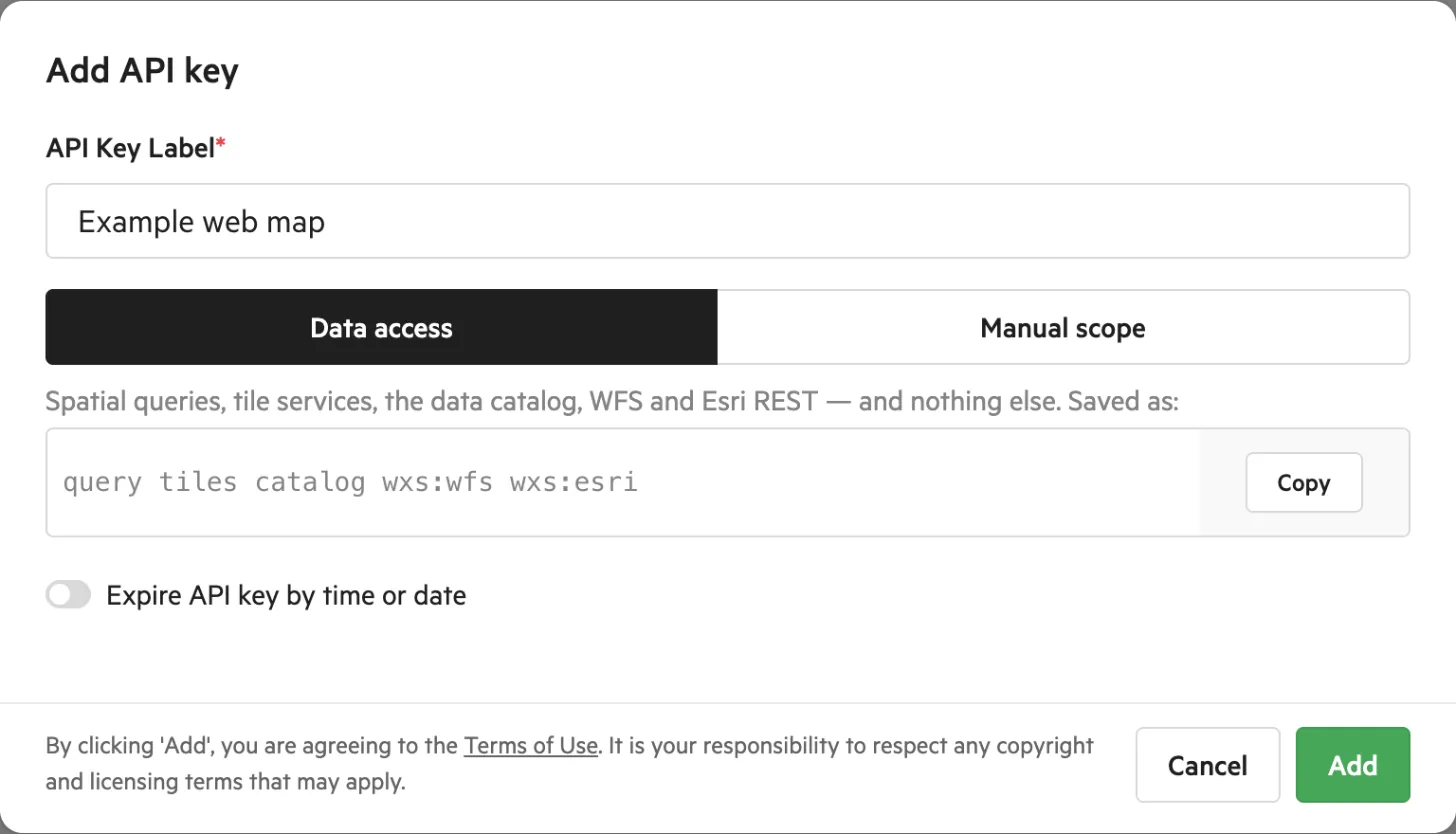
The Data access tab shows the scopes it saves.
Each layer, table and set lists the services it offers, the scopes each one needs and its URLs. The URLs show [api_token] where your key goes. Use those URLs rather than building your own. For Esri REST services, copy the URL from the layer’s Services and APIs tab.
Which scope each Administration API area needs
Section titled “Which scope each Administration API area needs”Most Administration API requests need the area’s read scope to view data and its write scope to create, change or delete it. For example, listing layers needs layers:read and creating a layer needs layers:write. The table shows these usual scopes, not a guarantee for every endpoint: some POST requests that only read data need the read scope, some actions need a different scope from the one their area suggests, and some endpoints need no scope. To check a specific request, look at the response headers. Every Administration API response includes an Accepted-OAuth-Scopes header naming the scope the request needed, and an OAuth-Scopes header listing the scopes your key has. See OAuth token headers.
| Area | Read scope | Write scope |
|---|---|---|
| Catalog items | items:read |
items:write |
| Layers and tables | layers:read |
layers:write |
| Publishing | layers:read |
layers:write |
| Documents | documents:read |
documents:write |
| Sets | sets:read |
sets:write |
| Exports | exports:read |
exports:write |
| Users and groups | users:read |
users:write |
| Kart repositories | repos:read |
repos:write (repos:push for pushing commits) |
| MapViewers | viewers:read |
viewers:write |
Send your key with a request
Section titled “Send your key with a request”Send the key in one of these ways, depending on the service:
| Style | Example | Used by |
|---|---|---|
| Header | Authorization: key YOUR_API_KEY |
Administration API, Query API, WMTS, XYZ tiles and WFS |
| Path | /services;key=YOUR_API_KEY/… |
WMTS and WFS on your site, and XYZ tiles on tiles-cdn.koordinates.com |
| Query string | ?key=YOUR_API_KEY |
Query API only |
| Service path | services.koordinates.com/…/key=YOUR_API_KEY/… |
Services hosted on services.koordinates.com: vector tiles (PMTiles, MVT, VectorTileServer) and COPC point clouds (/copc-overview/key=YOUR_API_KEY/…) |
For example, a WFS path key looks like https://koordinates.com/services;key=YOUR_API_KEY/wfs/… and a vector tile key looks like https://services.koordinates.com/vector-tiles/key=YOUR_API_KEY/….
Tile and service URLs are often on a different host from your site, such as tiles-cdn.koordinates.com or services.koordinates.com. Your key works on these Koordinates hosts as well.
Don’t send the key in two places in the same request. The Query API rejects a request that has both ?key= and an Authorization header with a 403 error (the message is invalid-authentication: Found both key= and Authorization: in request.).
Using a key on a site you don’t administer
Section titled “Using a key on a site you don’t administer”If you use keys on a site you don’t administer, such as LINZ Data Service:
- The API Keys page lists the keys for the site you’re on. Select View all API keys to see them all.
- A key made for another site is limited to the default Data access scopes:
query,tiles,catalog,wxs:wfsandwxs:esri. - A site can limit a service to Paid Seats or other users, so a key with the right scope can still be refused. Ask the site administrator.
When a scope is missing
Section titled “When a scope is missing”If your key doesn’t have the scope a request needs, the request usually fails.
- Administration API: the response is
401with the messageInvalid API key scope: requires 'viewers:read', naming the scope you need to add. The same scope appears in theAccepted-OAuth-Scopesresponse header. - Query API: the response is
403withinvalid-api-key: Provide a valid api key. The Query API gives the same error for a missing scope as for an invalid key, so check the scope first when you know the key is valid. The scope it needs isquery. - Tile services: a key without the
tilesscope is refused. The status code and message depend on the service.
Other key problems give different messages: Expired API key and Invalid API key (for a deleted, suspended or unknown key), and Invalid referrer for API key if the key is locked to domains.
To fix a scope error, add the scope in the message to the key, or create a new key with the scope.
-
Select API Keys in your user menu.
-
Open the ⋯ menu on the key’s row and select Manage.
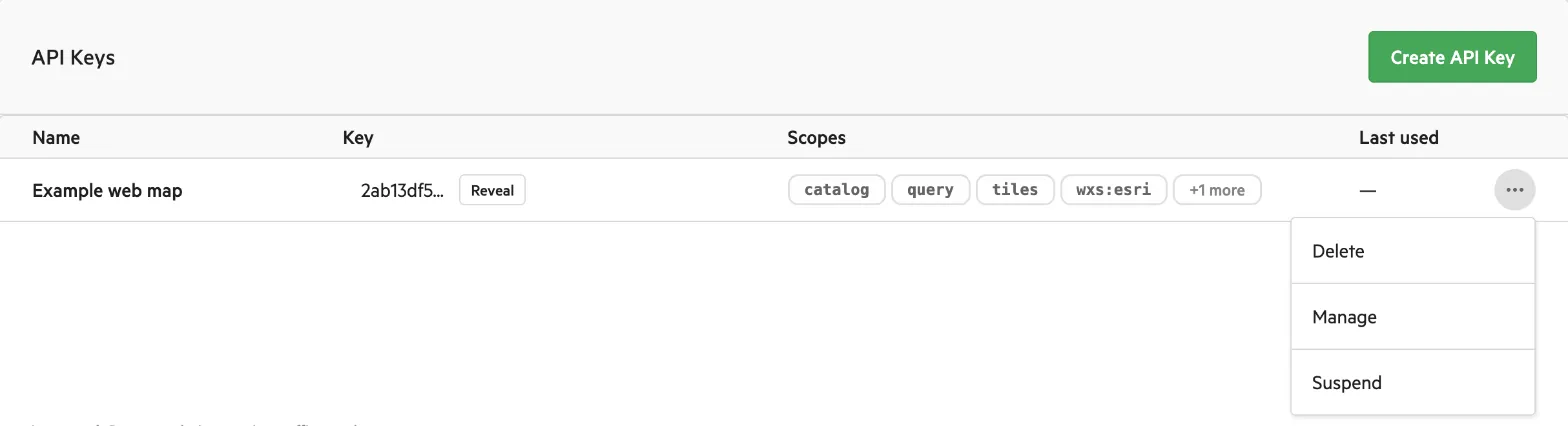
Manage is in the ⋯ menu on the key’s row.
-
On the Manual scope tab, turn on the data service you need. For other areas, open the group and choose read or write access from the list. The default is No access.
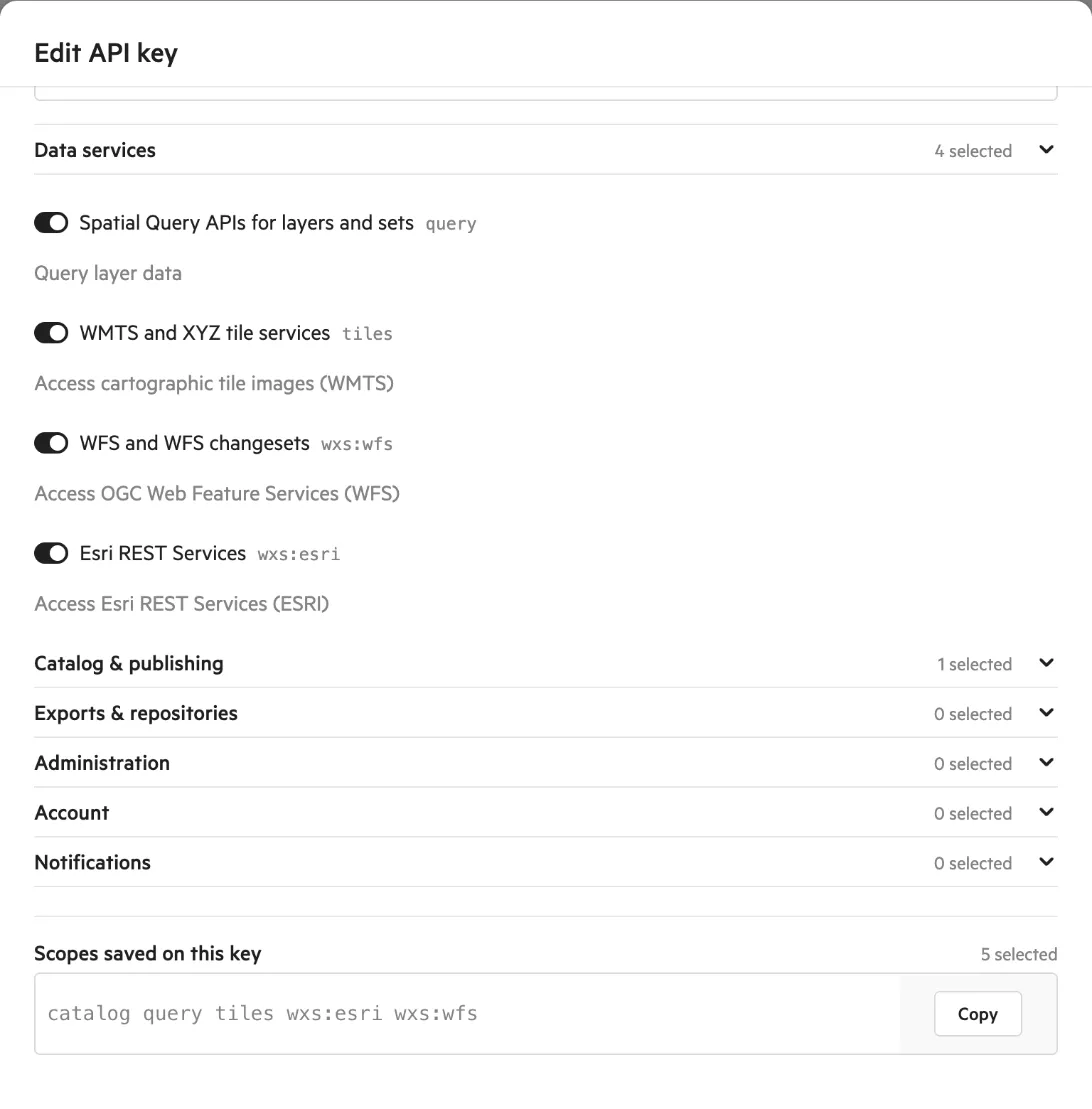
Data services are switches. Other groups have a list where you choose read or write access.
-
Select Update.